

Reliability Overview
The Reliability area is where you set, monitor, and respond to reliability promises about your services. Define a service-level objective (SLO), track compliance over time, and get paged before the error budget runs out.
This page is the workspace’s reliability home — the hub you land on when you click Reliability in the left nav.
What’s on this page
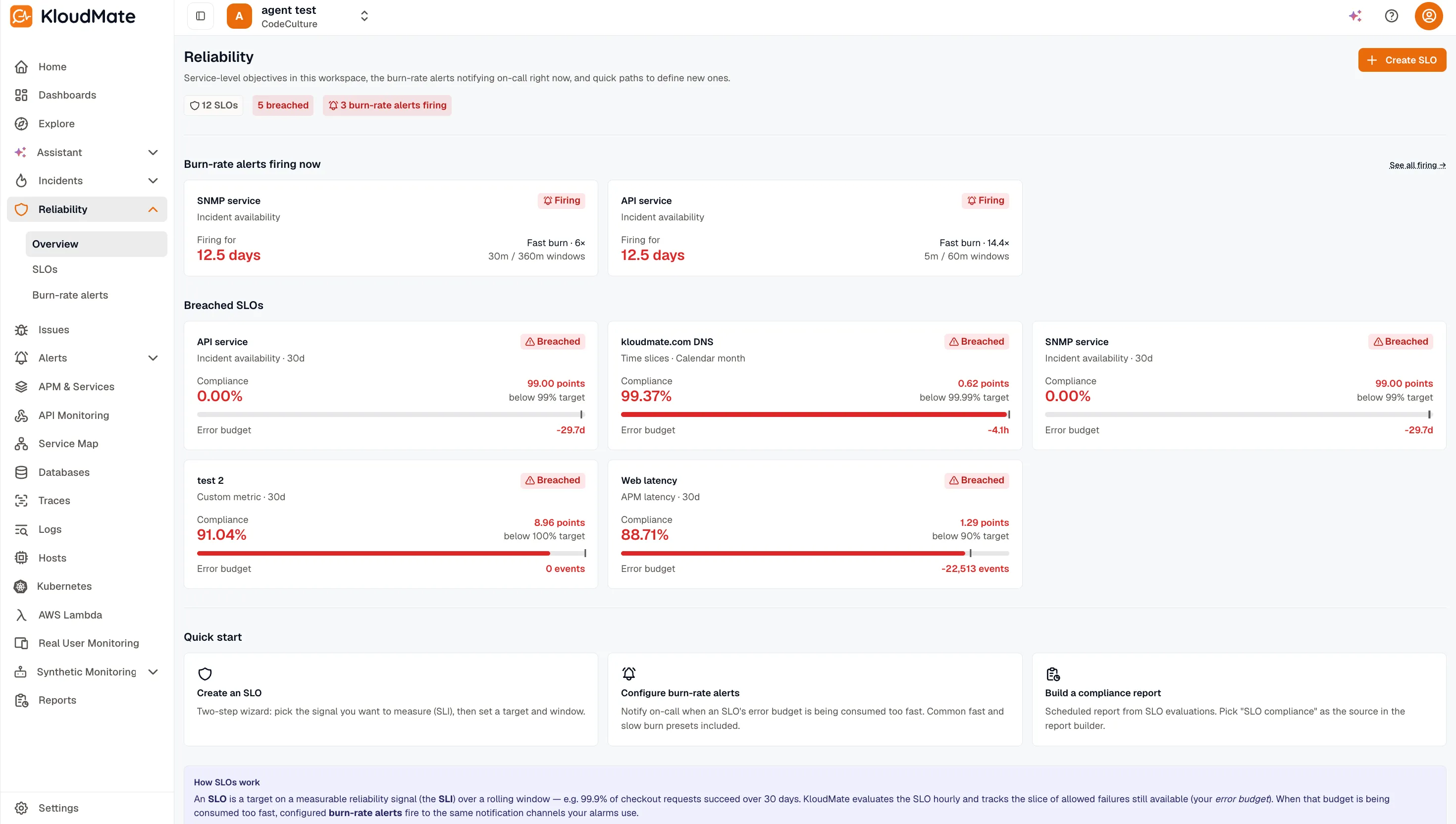
Section titled “What’s on this page”The Reliability Overview hub is composed of, top to bottom:
- Status strip — three clickable chips showing total SLOs, breached SLOs, and currently firing burn-rate alerts. Each chip deep-links into the matching filtered view.
- Burn-rate alerts firing now — cards for every currently-firing burn-rate alert, deduplicated by parent SLO. Empty state reads e.g. “All alerts quiet”. Each card opens the parent SLO detail.
- Breached SLOs — top 5 breached SLOs, compact cards with compliance / target / window. A “See all N →” link appears when there are more than 5 breached SLOs.
- Quick start — three action cards:
- Create an SLO → opens the two-step wizard (Create an SLO).
- Configure burn-rate alerts → opens the workspace-wide Burn-rate alerts list.
- Build a compliance report → opens the SLO Compliance report flow.
- How SLOs work — a single concept paragraph for first-timers.
How SLOs work
Section titled “How SLOs work”An SLO is a reliability promise written as “this service should achieve X% over a Y-day window.” You pick the signal you care about (the SLI), the target percentage, and the time window. KloudMate evaluates compliance on a schedule and alerts you when the error budget runs low.
Next steps
Section titled “Next steps” What is an SLO? Plain-English definitions of SLO, SLI, error budget, and burn rate.
Create an SLO Walk through the two-step wizard with a live compliance preview.
SLI kinds The six SLI kinds and when to use each.
Burn-rate alerts Page on burn-rate spikes before the error budget runs out.
Related
Section titled “Related” Alerts Per-event alerting and routing.
Incident Management Linked SLOs panel on incident detail.
Reports Add an SLO Compliance report as a recurring deliverable.