

Auto-RCA
Auto-RCA hands an Alert Group to KloudMate’s AI investigator the moment it opens, so by the time you open the group there’s already a root-cause summary waiting. You enable it per Routing Rule; every group the rule produces gets investigated.
Auto-RCA is the automatic trigger: it runs on every group a rule opens, without anyone asking. You can also start an investigation manually on any group with Run RCA, and open a finished one with View RCA. See Run RCA and View RCA.
How it works
Section titled “How it works”When a routing rule with Auto-RCA enabled opens a group, KloudMate schedules an investigation after the configurable Auto-RCA delay (default: 5 minutes). The delay gives related alerts time to fold into the group, so the investigation covers them all, not only the first alert.
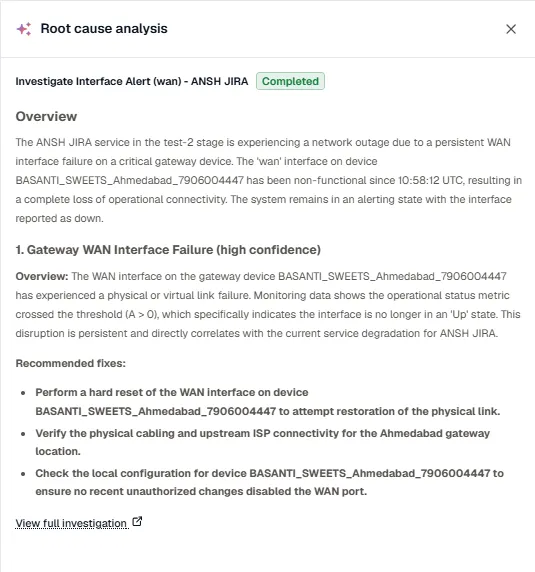
When the investigation completes, its summary attaches to the group:
- The group’s page shows a Root cause analysis card with a short overview and the numbered findings. Click Read full analysis or View RCA to read the whole analysis, which links to the full investigation. See Run RCA and View RCA.
- The notifications dispatched from the group include the investigation summary, where the channel format supports it: a Slack thread reply, a KloudMate Incidents comment, and so on.
Enable Auto-RCA on a routing rule
Section titled “Enable Auto-RCA on a routing rule”- Open Alerts → Routing rules and edit the rule you want to enrich.
- Scroll to the Auto-RCA section.
- Turn on Enable Auto-RCA.
- Set the Delay if the default 5 minutes isn’t right. A shorter delay surfaces answers faster; a longer one captures more alerts before the investigation runs.
- Click Save rule.
Every group this rule opens from now on triggers an investigation after the configured delay.
When Auto-RCA is most useful
Section titled “When Auto-RCA is most useful”Auto-RCA works best on rules that group related alerts: a spike after a deploy, cascading errors across services, or downstream impact from an upstream incident. For very narrow per-host or per-instance rules, the investigation has less to work with, and you may prefer to disable it to reduce compute usage.
Related
Section titled “Related”- Routing Rules: enable Auto-RCA per rule.
- Alert Groups: how an investigation attaches to a group.
- KloudMate Assistant: the broader investigator surface.