

Publish and roll out pipeline rules
Publishing a rule creates a new version of it. Agents keep running the version they have until the rollout reaches them, so you can change a live rule without a gap in coverage.
Click Publish in the rule editor and choose how the rule reaches its agents.
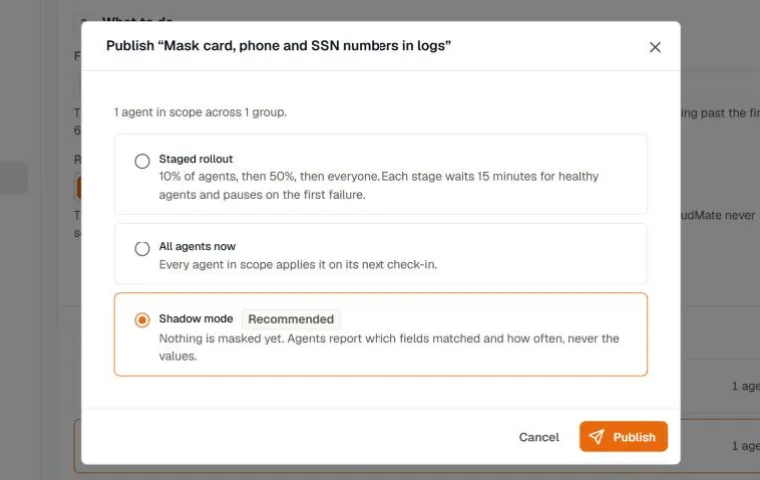
| Option | What happens |
|---|---|
| Staged rollout | 10% of the agents in scope get the rule, then 50%, then every agent. Each stage waits 15 minutes for healthy agents and pauses on the first failure. |
| All agents now | Every agent in scope applies the rule on its next check-in. |
| Shadow mode | Drop and mask rules only. Agents count what the rule would do and change nothing. |
Try a rule in shadow mode
Section titled “Try a rule in shadow mode”Shadow mode shows the effect of a drop or mask rule on real traffic before it changes any data.
- Publish the rule with Shadow mode.
- Open the rule and go to Activity. For a drop rule, it shows what the rule would drop and how much data that would save. For a mask rule, it shows how many values would be masked and where they matched. Agents report the field, the detector, and the shape of a match, never the value.
- When the numbers look right, click Edit rule and publish again as a staged rollout or to all agents now.
Follow a staged rollout
Section titled “Follow a staged rollout”The Rollout tab of a rule shows each stage and how far the rollout has got. A stage moves on once its 15-minute soak time has passed and every agent in it reports the new version applied. An agent that stays silent holds the stage, and a failure or a revert pauses the rollout with the reason.
From the Rollout tab you can:
- Pause and Resume the rollout. Agents that already applied the rule keep it while it’s paused.
- Promote to the next stage now, without waiting for the soak time.
- Finish rollout to apply the rule to every agent in scope.
- Abort rollout to return the rule to a draft. A draft runs on no agent.
See what a rule did
Section titled “See what a rule did”Open a rule from the list and go to Activity. Agents send counts about once a minute for the live version of the rule.
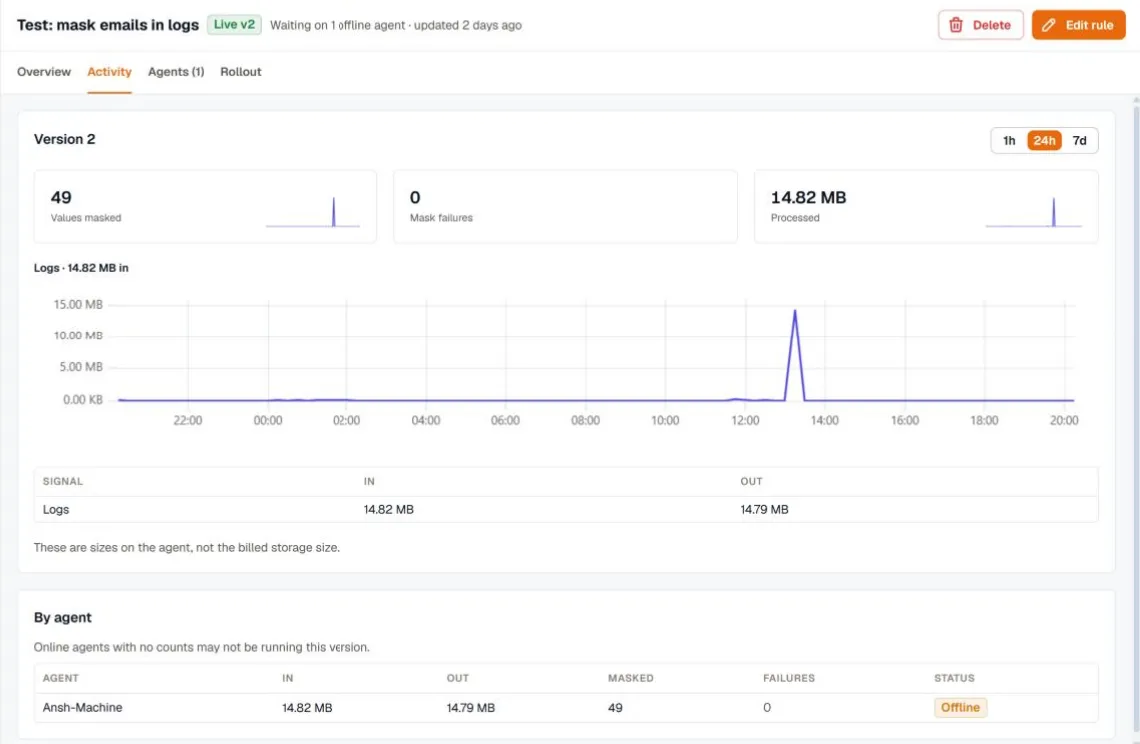
- The summary at the top depends on the rule type: values masked and mask failures for a mask rule, or records dropped for a drop rule.
- In and Out compare the size of the data before and after the rule. These are sizes measured on the agent, not your billed storage size.
- By agent breaks the same counts down per agent. An online agent with no counts may not be running the current version yet.
The Agents tab lists every agent in scope, the group that put it there, and the rule’s status on it.
Rule status on an agent
Section titled “Rule status on an agent”| Status | Meaning |
|---|---|
| Applied | The agent runs this version of the rule. |
| Shadow | The agent counts what the rule would do without changing data. |
| Skipped | The agent can’t run the rule. Its version is too old for pipeline rules, or the rule needs a sampling gateway the agent doesn’t have. |
| Failed | The agent couldn’t apply the rule and kept its previous configuration. |
| Reverted | The agent applied the rule, hit a problem, and returned to its previous configuration. |
| Removed by override | The agent’s custom config override removed the rule. Turn on Enforce for masks that must always run. |
A failure or a revert during a staged rollout pauses the rollout.
Edit or delete a rule
Section titled “Edit or delete a rule”- Edit rule opens the editor. Saving a draft doesn’t change any agent. Publishing creates the next version and rolls it out the way you choose.
- Delete removes the rule. Agents stop running it on their next check-in, and it can’t be undone.